register_link

Blog Archives

Why you should not underestimate the Release Radar

What you'll learn in this post:
  • How the Release Radar works and what the criteria are for your song to appear in it
  • What you can do to generate more streams via the release radar
  • Our evaluation of over 2,800 songs, showing how important the release radar is in the release week

The Release Radar offers listeners the new tracks of their favorite artists on a weekly basis. The evaluation of iGroove shows that this leads to significantly more streams for the artists in the release week.

Launched in 2016, Release Radar is one of the most handy features on Spotify for music fans. Every week, they find out what their favorite artists have released. This is also the advantage for artists, because listeners who don’t follow every move you make don’t miss your new release and give it a listen. Our evaluation shows how important the radar is.

What is the Spotify Release Radar?

The Release Radar is an algorithmically generated playlist that is created individually for each Spotify user on a weekly basis. The radar gives listeners an overview of the week’s new releases. According to Spotify, the Release Radar is said to generate more streams than any curated Spotify playlist. This is quite plausible, since curated playlists only include a fraction of artists, but everyone has a chance to get on their fans’ radar.

The criteria

  • In order for a release to be considered for the radar, it must be delivered to Spotify at least one week before the release date
  • It’s not necessary to pitch a release that it appears in the radar. However, if you want to have a certain song in the radar, you have to pitch it. If the pitched song is changed in the 7 days before release, it won’t be taken into account.
  • The release radar includes artists that the user follows, whose music he has listened to, or artists that the algorithm thinks the listener might like.
  • If the listener has already heard a song (e.g. because it was released as a single), it won’t appear in the radar. But possibly another track of the release
  • Songs for which you are the main or feature artist are taken into account. If you are marked as a remixer, it won’t appear in the radar as well as songs with various artists.
  • Re-releases of songs that are already available on Spotify are not considered
  • Each listener gets only one song per artist per week in their radar
  • A song can stay in the radar for up to 4 weeks if the listener has not listened to it yet

What else you can do

  • Try to encourage your fans to not only listen to your music, but also to follow you. The more followers, the more radar streams
  • Release as many singles as possible. With an album you are only in the radar once, but with regular single releases you are constantly in the radar of your listeners.

The Release Radar analysis

We evaluated over 2,800 songs from artists in various genres with different reach. The analysis shows that the Release Radar is responsible for an average of around 14% of streams in the first week. However, the range is wide, for some it only makes up a low single digit share, especially if they are already in large playlists, for others half of the streams or even more come off the radar.

The release radar can give you a good boost especially in the important first week and lead to numerous streams and saves.

You can see how many streams were generated by the radar in your Spotify for Artists. Select the corresponding song and go to the playlist tab.

When can I get back on tour?

What you'll learn in this post:
  • What live music professionals think when concerts will happen again
  • What financial losses the live industry has suffered
  • How it could continue in 2021

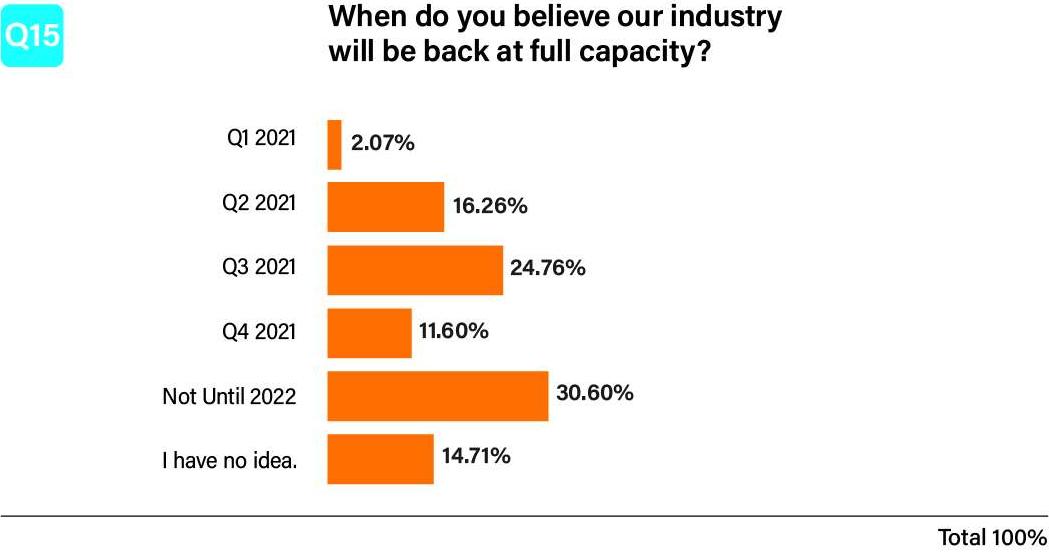
More or less worldwide, the concert business is at a complete halt. Countless concerts and tours were canceled in the Corona year, and it’s the lack of fees that is causing existential fears among countless artists. That’s why one of the most pressing questions of our time for musicians is: when can I finally get back on stage? Pollstar asked this question to 1,350 employees from the live music sector.

Cautiously optimistic

The survey shows that industry experts are cautiously optimistic. Slightly more than half of the respondents (54.7%) believe that full capacity will be reached again in 2021. However, only 2.07% believe that this will already be the case in the first quarter. After all, 16.26% believe in the second quarter and a fourth of the respondents consider the third quarter to be realistic.

But not everyone shares the optimism. Almost a third believes that we won’t be able to go to concerts like in the pre-Corona era until 2022.

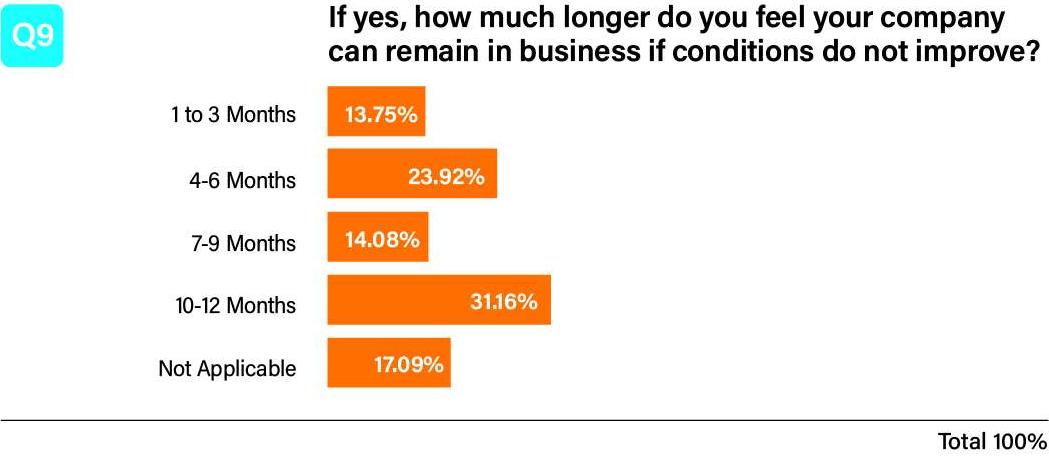
It’s therefore not surprising that 75% are prepared to continue working with lower capacity, even if this cannot be a long-term solution. The majority of respondents state that they will be able to continue their business for another year at most if the situation does not improve.

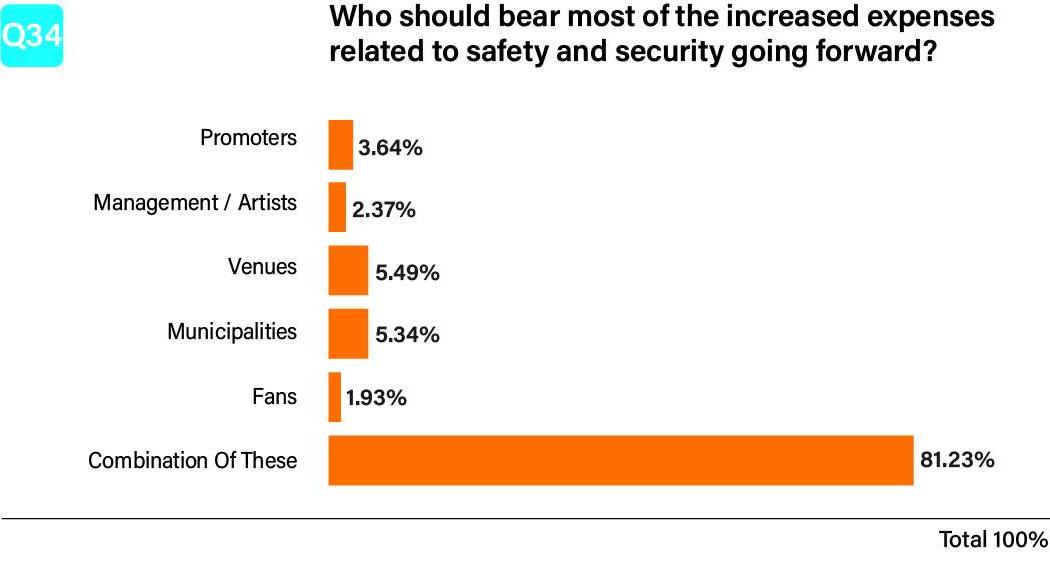
Most respondents agree that there will be additional costs due to increasing precautions. However, only 2.37% believe that the majority of these costs will be passed on to the artists and their management. Most believe that the additional costs will be shared between event organizers, fans, promoters and artists.

Drastic losses in the live industry

A further and even more recent study by Pollstar shows that the live industry has suffered losses of 30 billion worldwide this year. 9.7 billion alone relates to losses by the concert promoters themselves. The rest is made up of lost revenue from hotels, restaurants, merchandise, ticketing, sponsorship, transportation, etc. related to shows or festivals that didn’t take place.

It should and could have been a great year for the live industry. This is shown only by the figures of the first quarter, when there was still a growth of 10.92% compared to the previous year. The rest of the story, however, is well known.

After a decade of steady growth, the drastic slump came in 2020.

What will happen in 2021?

As in many other industries, concert organizers are hoping for an early impact of the vaccinations. For everyone it’s clear that a lot of flexibility will also be needed in 2021. Organizers and artists will have to regularly adapt their plans to the circumstances and one will probably see a gradual opening.

Many promoters assume that shows that appeal more to a younger audience will bounce back more quickly. If the target audience is older, it will take a bit more time. In general, it’s hoped that the comeback will begin slowly but surely in the summer. Meanwhile a complete normalization is not expected before 2022.

In addition, many insiders expect the market to become oversaturated once things normalize, as planned tours of two years are packed into just one year.

The situation remains uncertain for the time being, but there is also justified hope for a return to normal. Until then, artists will have to find new ways to get in touch with their fans and compensate for the loss of income. In addition to creative concert ideas or virtual shows, the main thing is to find new income opportunities.

Why the crisis for musicians will continue after the pandemic

What you'll learn in this post:
  • Why musicians were not only among the first to be affected by the pandemic, but will also be among the last to completely return to normalcy
  • What this has to do with collecting societies
  • How much the distributions of the collecting societies have decreased

Even if the pandemic would be over soon, many artists will feel the after-effects even longer. Find out why this is related to collecting societies and why musicians won’t feel the effects until 2021 or 2022.

The situation of many musicians currently looks something like this: The income from streams and sales remains more or less stable, they get money from the collecting societies but what is missing is the income from gigs and with that maybe also a slump in merch sales.

Let’s take a look at a hopefully near future where the pandemic is under control. Revenues from the live sector are flowing again as usual, and so all is well and as it used to be. Unfortunately, not quite. The problem lies with the income from the collecting societies. They pay out with a delay of 6 months up to two years. For artists, a decline is only noticeable later.

And this decline is massive. According to the recently published Global Collections Report global revenues will decline between 1.8 and 3.1 billion. After growing for years, they are expected to decline by 20-35% in 2020. However, musicians will not really feel the effects of this decline until 2021 or even 2022. Since half of all revenues are generated in Europe, we are particularly affected here.

The falling numbers are due to the virtually complete shutdown of the live sector, but also to the closure of restaurants, bars, etc., which have to pay license fees for playing songs.

Unfortunately, musicians were among the first to be affected by the crisis and will be among the last to completely return to normal.

It is therefore essential that every musician includes these declining revenues in their financial planning. It would be equally important that a long-term state aid for artists is now quickly and unbureaucratically initiated.

YouTube Premiere: The practical updates

What you'll learn in this post:
  • Now you can set up a livestream before or after the premiere
  • In addition, there is now also a trailer function and various themes
  • How many subscribers you need to use livestreams and trailers

YouTube Premiere can help you build anticipation for your music video and also generate additional views. Now there are some handy updates that make the tool even more attractive.

We recently introduced you to the advantages of YouTube Premiere in a post. A feature that is used more and more, especially since Corona.

Now YouTube has added some updates that should additionally help to generate as much hype as possible around your music video. We present these to you.

Livestream as pre-show

It is now possible to go live before the set up premiere of your video clip. As soon as the livestream ends, viewers will be redirected directly to the video premiere. With the livestream, you can not only further fuel the anticipation, but also reveal some details or background info about the clip or song, for example.

It is also possible for viewers to be redirected to a livestream after the premiere.

Trailer

Trailers are another tool to further build anticipation. These are displayed on the premiere’s landing page. Videos must be between 15 seconds and three minutes long.

To be able to use the Livestream pre-show function as well as trailers, you currently still need to have at least 1,000 subscribers.

Themes

Soon it will also be possible to select the countdown before the video. There will be different options available, so you can insert exactly the countdown that fits the vibe of the video.

More information can be found here.

Instagram Shopping: Sell your merch on Instagram

What you'll learn in this post:
  • What significance Instagram has for the purchasing decisions of users
  • How to set up your own store on Instagram
  • What options are available to you for selling your products

Turn your Instagram profile into a showcase for your products. Instead of trying to drive fans to your web store via Instagram, it’s easier to integrate it directly into your Instagram profile. According to Instagram, 70% of frequent shoppers are said to use Instagram to discover new products. And as many as 87% said influencers inspired them to make a purchase. Therefore, turn your Instagram profile into a sales space.

Instagram Shopping is not yet available in all countries, here you can find the complete list of markets where Instagram Shopping is live. What you need is a Business or Creator account. In addition, the profile must be linked to Facebook.

Then you can enter your products via the Facebook Catalog Manager. The next step is to set up your own store on the Instagram app under Settings -> Business -> Instagram Shopping. The verification process takes a few days.

Once the store is set up, the following options are available:

  • On your profile, a “View Shop” button will appear under your bio, which will take users directly to your Instagram store.
  • The integration is done via your own webshop or providers like Merchbar, Manhead or Merchtable. Linking to external stores like Amazon is not allowed.
  • You can tag up to 5 of your products in posts and stories, and the tag will take users directly to your Instagram store.
  • From now on, products can also be inserted into Reels.
  • Of course, there is also the possibility to buy shopping ads. With these, your products will be highlighted in the “Shop” section of the Discover tab or in the feed. These can be set up in the Ads Manager.
  • It’s only possible to sell physical products. The sale of tickets or the link to streaming services is not possible.
  • All further information here

Instagram will continuously expand the shopping options. For example, there are various features that are only available in the U.S. so far, but should soon be available in other countries as well. Among them is the option to buy directly on Instagram, pay with Facebook Pay and thus not even have to leave the app. But already without these additional features, you increase the reach for your products significantly.

Advances: Opportunities and risks

What you'll learn in this post:
  • The most common concerns about advances
  • The fact check on these concerns
  • How the advances work at iGroove

Advances always cause heated discussion. While for some musicians it’s the declared goal to get the highest possible advance, for others it’s nothing but a rip-off. We have collected some of the frequent statements and show you the chances and risks. One thing is for sure: an advance is not a gift. You simply receive the money you would earn in the future already now.

Advances drive artists to financial ruin

It’s standard that advances are non-refundable. This means that the artists are not liable with their private assets and the label / distributor bears the economic risk. Advances that must be repaid under all circumstances are not recommended.

With iGroove, the advance only has to be recouped with the contractually defined releases. If the amount is not recouped after the agreed term, it’s extended. The artists are never liable with the private assets.

Advances are just the same as a loan / credit

Despite some parallels, there are also substantial differences. This is primarily that a credit / loan must be repaid in any case. The risk therefore lies with the borrower. In addition, you pay a fixed interest rate each month, while this varies with the advance depending on how the releases perform in the respective month.

Advance contracts are non-transparent and artists are being ripped off

This happens without a doubt. We therefore recommend that you seek advice from a specialist, such as a music lawyer.

iGroove focuses on full transparency and easy-to-understand contracts. You can determine the term and conditions yourself and see the costs listed in detail. In addition, you can always see how much has already been recouped.

I’m dictated what I use my advance for

Generally there are two types of advances:

Production cost advances: As the name suggests, this is used to pay for the production of the release and is therefore earmarked.

Advances on license payments: In the vast majority of cases, these are not earmarked.

Advances from iGroove are not earmarked and can be used for any purpose.

With an advance I also give away income from concerts, merch etc.

In fact, so-called cross-collateralizing is increasingly becoming the standard. This means that you have to recoup the advance not only with a release, but also with income from publishing rights, concert fees or merchandise. It’s advisable to consult a specialist when negotiating the contract.

There is no cross-collateralizing with iGroove. The advance must only be recouped with the contractually agreed releases.

The fees are insane – I have to pay back more than I receive

An advance is only ever recouped with the artist’s share of the revenue. For example, if you have a 50:50 deal with a label and receive a 10,000 advance, your release must generate 20,000 until the advance is recouped. This covers the label’s risk in the event that the advance is not recouped.

iGroove’s share is between 14-18%. If you choose a 15% deal and receive 10,000, your advance is recouped once the release has raised 11,500.

Advances tie me to a label / distributor for the long term

This is a matter of negotiation. Often contracts go over several releases and the labels can redeem a so-called option. This can have a direct influence on the amount of the advance for your next release through the minimum or maximum fund: for example, if an advance was recouped, the maximum fund comes into play for the next release, if not the minimum.

At iGroove, each advance is calculated from scratch by our artificial intelligence.

If I don’t recoupe, I have to deliver more releases

If an advance is not recouped, it often has to be recouped with the next release. For example, if you received 20,000 but only recouped 10,000 and you receive 10,000 advance for the next release, you must recoup 20,000 again.

The problem with such long-term contracts can be that the terms remain the same, even if you’ve grown tremendously as an artist.

At iGroove, an advance always refers to the contracted releases only and never to additional future projects.

Advances are a big risk because I never know if I will recoupe

This is only a problem if the artist has to recoup in any case, which we do not recommend. Especially because labels miscalculate more often than you might think. Also, you have to make sure that the advance is not at the expense of the budget for promotion / marketing, which the label invests in the release.

iGroove calculates advances very precisely using artificial intelligence. Thus, we reduce our risk, as well as that of the artist not to recoup. In addition, as an artist, you get a realistic preview of your future earnings.

Advances are only for big artists

Until now, this has indeed been the case for the majority. Smaller labels have no budget for advances and the big players hardly sign artists with a small reach.

iGroove wants to change that and also allow artists who are just making their way up to the top to receive advances.

Advances do not bring benefits to the artist

In fact, an advance is not equally valuable at every career stage. An advance can be helpful in the following situations:

  • Planning reliability: you know how much money you have available for the next few months
  • Budget: You use the advance to cover the costs of a release
  • Bypass: Especially an advance for already published releases helps when money is tight
  • Career step: If you want to put all your eggs in the music basket, an advance can help you achieve this goal and free you from the pressure of having to work a regular job.

Thanks to iGroove’s transparency, you can see at a glance what amount you will receive and also what costs will be incurred. We also calculate the expected streaming revenue for the next 48 months, which helps you to better assess whether you need an advance or not and what amount of advance you can realistically recoup.

Increase the reach of your music video

What you'll learn in this post:
  • Why reach is more important than views
  • Why it may be worthwhile to publish the video on another channel with greater reach
  • What the advantages of working with influencers are

If you have invested time and, above all, money in a music video, you obviously want to generate as many views as possible with it. It’s therefore important to promote your YouTube video properly, maybe even set up a premiere or book a YouTube ad. However, getting as many views as possible on your channel is not all that counts. We’ll show you why.

You must always keep in mind that the main purpose of the video is to gain new fans and encourage them to stream or buy your song. It’s therefore irrelevant whether all views are generated on YouTube or on different channels. The only thing that matters is to make potential listeners aware of your release.

Facebook

You can certainly make a post with the YouTube link. However, it’s much more effective to upload the video directly to Facebook. Every platform wants to keep traffic on their site, so directly uploaded videos reach significantly more people than external links.

Instagram

Except for the bio, links are practically useless on Instagram. Therefore, you should post a trailer as a post and story and provide the whole video via IGTV.

Use the reach of others

Everyone wants their video on their own channel to gain not only views, but also additional subscribers. But if you don’t have that many followers on your channel yet, it’s worth placing your video on a channel with a large reach.

To increase awareness, it’s worth working with influencers. This does not necessarily result in many views on YouTube, but it increases the reach enormously and ensures additional streams and downloads.

Equally important are the micro-influencers, in other words, your fans. Send the video or trailer to your mailing list and ask your fans to share it on their channels and tag you.

How do I pitch my song on Spotify?

What you'll learn in this post:
  • What the deadlines are for pitching to Spotify
  • How to increase the chance of a successful pitch
  • What to consider when filling out the pitching form

Spotify makes it easy for artists and labels to present their songs to curators with their pitching tool on Spotify for Artists. According to Spotify, about 20% of the pitched songs will be included in a playlist. So there are a few things to keep in mind to stand out from the crowd and increase your chances. We will show you how to proceed and which mistakes should be avoided.

Deadline for pitching on Spotify

Spotify requires that a song must be pitched at least one week before release. Depending on how fast your distributor works, you have to upload the song at least two weeks or better even earlier.

Pitching the song on time also has the advantage that the release radar of your fans doesn’t show just any song of your release, but the one you pitched.

Maintain your Spotify profile

Maintaining and updating your Spotify profile is generally important, also for the pitching process. When you pitch, the curators see your bio and the social media links you’ve entered, which helps them avoid research. If this information isn’t filled in, it’ll not leave a good first impression. Take the time to fill out all the information and keep it up to date.

Choose the right song

Pitch your best song, which is also suitable for playlists. A seven-minute track with a two-minute intro is appropriate for the fewest playlists.

Songs that have already been released, e.g. as an advance single, cannot be pitched again. In general it’s worthwhile to release several singles, because you can suggest more songs . There must always be at least a week between them, because you can never submit two pitches at the same time.

Tags

The form asks you for information about genre, moods, song styles or instruments. This looks a bit like Spotify is mainly collecting data. But Spotify explains:

“The information about genre or mood are extremely helpful for us to introduce the song to the curators”.

So think carefully about which tags fit your song best and don’t try to turn a jazz song into a pop anthem with wrong information. The only thing you will achieve is that the track will end up with the wrong team.

Song description

At the end you have the possibility to describe your song. You are limited to 500 characters and should therefore think carefully about what information you share. Spotify wants to know more about the creation of the song, the inspiration, with whom it was created ( name-dropping!) or generally the story behind it. Put the song in the best light, but avoid too many superlatives.

Also save some space for planned promotions, information about media reports, concerts or the reference to the video of the track.

Spotify has announced several optimizations of the pitching tool. With us you will stay up to date about relevant changes.

Playlist pitching with iGroove

iGroove’s Playlist Pitching introduces your song not only to Spotify, but also to the curators of Apple Music, YouTube Music, Deezer, Amazon Music and Tidal, where it is not possible to pitch the song yourself. Learn more

Promote your music with Triller

What you'll learn in this post:
  • How Triller works
  • How to promote and monetize your music on Triller
  • How to make your music available on Triller as an iGroove customer

Hardly no other app has as many downloads in 2020 as Triller. Find out how you can promote yourself and your music on one of TikTok’s biggest competitors.

Triller is one of TikTok’s biggest competitors and has around 65 Million active users per month, according to their own data. Many well-known US musicians already use the app intensively and along our latitudes also, its popularity is rising rapidly. Thus, musicians have another tool for

How does Triller work?

With Triller you can make professional videos (up to 60 seconds) using only a few taps and numerous filters. These can be shared not only on the platform itself, but also on Instagram, Facebook, Twitter or WhatsApp. And of course, you can add music to those videos. Triller places an even greater focus on music than TikTok or other similar social media video apps. Very much in the foreground is hip hop.

Promote your music with Triller

Thanks to Triller you have another way to promote yourself, and in addition, fans can use your music in their clips, through which new potential listeners can discover you. Even though you should never use the same strategy for two different social media platforms, there are a few things that can be adapted from TikTok:

  • Take part in popular challenges or start one yourself
  • Use hashtags effectively
  • Share content from fans who have used your music
  • Work with influencers

Monetization

Fans have the option to make a donation to artists in the form of Triller gold which can then be exchanged for real money. However, in order to receive such donations, you have to be verified.

If you’re a famous artist, you normally get the verification immediately. For everybody else there are unfortunately no clear parameters. What certainly helps is:

  • Posting regularly and increasing the likes, shares and comments
  • Building up a large fanbase

Your music on Triller

In order for your music to be available on Triller, it must be made available through your distributor. As of now, all releases made by iGroove clients who in their submission have chosen 7Digital as their shop, are available on Triller. This also applies to releases which have already been made public.

More information about the app can be found under triller.co

How do I get the blue check on Instagram?

What you'll learn in this post:
  • How to apply for the blue check and what you need to provide
  • What the criteria are and what dos and don'ts to consider
  • What advantages the verification offers
  • How iGroove can help you get the blue check

It’s one of the questions we hear most often from artists: How do I get the blue check on Instagram? It’s easy to apply for it, but unfortunately not so easy to get it. We will show you how to proceed and what the criteria are to get the much desired blue check.

Anyone can request verification directly from the Instagram app. Go to Settings -> Account -> Request verification. Instagram makes it clear that the check mark is only given to public persons, celebrities or global brands / companies. Therefore, it’s also clear that a request does not guarantee that the account will be verified. After all, there is no minimum requirement in terms of followers, the decisive factor is your nationwide reputation.

This is how you apply for the blue check on Instagram

Beside your full name you have to enter your artist name or the name of your label / company at “Known as”. Next choose the appropriate category (e.g. music) and finally attach a valid (!!) ID document. As a company, you must attach an official and up-to-date document such as an extract from the commercial register, tax document or utility bill. After a few days you’ll be notified whether the verification has been approved.

Other criteria for the blue check

Besides the main criterion of public interest in a person or company, Instagram also pays attention to the following:

  • Authenticity of the channel
  • Whether the channel is set to public
  • All information filled out: Profile picture, biography and at least one post (better many more)
  • Accurate information. Incorrect entries can even lead to the blocking of the profile.
  • Whether you appear regularly in (national) news

Dos and Don’ts

  • Make sure that your online presence is up to date outside of Instagram. For example, add relevant media coverage about you to your website.
  • Do not link to other social media channels in your bio!
  • Put all relevant information into your bio.
  • Post regularly and also use Stories.
  • Don’t give up: 30 days after a refusal you can already try again.

What are the benefits of verification on Instagram?

Apart from the fact that the check has become a status symbol, it helps your fans to be sure that this is your official channel and not e.g. a fan account.

You can use the Swipe Up function for stories, even if you don’t have the 10,000 followers that would otherwise be required.

You also get access to new Instagram features before they are available to everyone.

We help you with the verification

Are you an iGroove customer with over 10,000 followers on Instagram but verification didn’t work? Contact our support and we will help you to get the blue check.

How to identify fake streams

What you'll learn in this post:
  • How to feed the algorithm properly
  • Which metrics can be used to identify fake streams
  • Where to find these key figures

Have you booked a streaming promotion and are not sure if it’s serious? Are you a manager who wants to take a closer look at an artist? Here you can find out how to check if the streaming numbers are legitimate or if bots were used.

The number of streams is one of the most important characteristics for success and of course also for income. It’s equally important that the algorithms are fed correctly. Therefore, it’s not only the increase of streams that counts – and certainly not with illegal methods. To get into algorithm playlists, the algorithm must be fed with good data. But if you buy into playlists that only generate bot streams, you feed the algorithm with negative data. The following factors show whether bots were involved.

Streams / Saves ratio

If you use bots, you have many streams but hardly any saves on a song. Normally the saves are about 6-10% of the streams. With botted tracks it’s 3% or less.

Streams / Listeners ratio

The ratio between streams and number of listeners of a song should be between 40-60%. So you have about twice as many streams as listeners. Bots often play a song only once, if streams and listeners are virtually identical, this is suspicious. Few listeners are just as noticeable, this indicates that the song is played in a continuous loop.

Desktop / Mobile ratio

Most people consume music via their cell phones. If the percentage of streams coming from desktop devices is over 20%, this indicates that the streams are botted.

Free / Premium ratio

Even though Spotify has more listeners with free subscriptions than paying customers, the premium accounts generate more streams. If a significant portion of the streams come from free accounts, it’s suspicious.

Important: All percentages are approximate guidelines. Exceptions can confirm the rule.

Fans also like

This section shows what else your fans listen to and these are mostly artists who make similar music. If you find artists from completely different genres here, this hints at bots. If an artist has hundreds of thousands of fans, but no “Fans also like” section on his profile, this is also fishy.

Playlists

Often fraud is happening via playlists. Here too, a numerical comparison between streams and listeners is worthwhile (proportion 40-60%). Playlists with many followers but only unknown songs, missing covers and strange names are suspicious. Often a playlist has thousands of followers, but the creator of the playlist has almost none.

Monthly Listener vs. Follower

As already mentioned in another article, followers should be about 5% of the monthly listeners. If the number is below that, this can only be explained if you have a song in a big playlist.

Listener & Follower Development

If an artist works with bots, one will see massive leaps in the long-term development of listener and follower numbers. A slow but steadily increasing curve is normal.

Origin of streams

The origin of the streams is also worth a look. Bot farms are often located in countries where Spotify doesn’t even exist. They bypass this via VPN, so that you suddenly have an excessive number of streams from small towns. You should also pay attention to whether an excessive number of streams come from the same place.

Analyzing an artist’s numbers accurately requires time and access to their Spotify for Artists and sales trends from their distributor.

Spotify Update: The new tools you should know!

What you'll learn in this post:
  • How to push your release with promo cards
  • The benefits of Spotify Shows for podcasters and musicians
  • What the advantages of Canvas are
  • How to display the dates of your virtual concerts on Spotify

Spotify continues to offer new features and possibilities to its users and artists. We’ve summarized some of the new features of the last few weeks to keep you up to date.

Promo Cards

In order to increase your Spotify followers and in the long run your audience and revenue, you need to keep encouraging your fans through social media and other channels to follow you on Spotify. Thanks to the new tool from Spotify, this is now easier and more visually appealing.

With Promo Cards you can create a banner in a few simple steps and share it on your channels. First you have to decide if you want to create the Promo Card for an artist, an album or a song. Then you can define the background color and the format and you can share or download the result.

If your song is in a big playlist, the song search will also list it. You can create your own promo card for this playlist placement. It’s also possible to create Promo Cards for podcast shows or single episodes.

Get started now and personalize your Promo Cards on artists.spotify.com/promocards.

Shows

Until now, if you uploaded podcasts to Spotify, it wasn’t possible to include songs, unless you licensed the tracks. With its new feature Shows, Spotify now combines music and spoken contributions. This is made possible by the podcast app Anchor, which Spotify purchased last year.

Advantages for podcasters

Podcasters can now not only talk about music, but also play it effectively. All songs available on Spotify can be integrated into podcasts for free. You have to use Anchor’s app and the podcasts can only be published via Spotify.

It’s not possible to include only a part of the song, the whole track is always played. Users with a premium subscription hear the whole song, free accounts only the 30 second snippet.

Advantages for musicians

Shows offers the possibility to generate additional streams. Each stream in a podcast is paid exactly the same as a regular stream on Spotify.

For musicians who have already entered the podcast game themselves, this is of course a great advantage.

Shows are now available for all Spotify users worldwide. The ability to add songs to their podcasts has only been available to creators in the United States, UK, Canada, Australia, New Zealand and Ireland. Further countries should follow soon.

More information here.

Although they haven’t been around that long, Spotify has become the most important source for podcasts and has replaced Apple at the top. With Shows this rise will continue.

Canvas

Canvas is a feature of Spotify that allows you to add looped visuals to songs (3-8 seconds). Spotify only offers this feature to selected artists – but from now on it can be used by all iGroove artists.

What are the advantages?

According to Spotify, the probability rises that listeners will

  • continue streaming (5%)
  • share the song (145%)
  • add it to their playlist (20%)
  • save it (1,4%)
  • visit your artist profile (9%)

If you or your fans share the song in Instagram Stories, the Canvas will play, including the song info and a direct link to Spotify.

Canvas can be added via Spotify for Artists. Click on the desired song and then on the button “Add Canvas” in the upper right corner.

Are there statistics?

If you use Canvas for a song, Spotify for Artists now shows you how many times it has been viewed. Click on “Music” and you will see the number of views for each song.

Further tips:

  • Don’t use footage of people talking, singing or rapping because it won’t be in sync with the song
  • Not every phone displays canvas the same way and the menu covers the lower part of the screen. So make sure that the action takes place in the middle of the screen
  • Do not use artist, song or album name – these are already visible
  • Tell a story with the loop and make sure that your Canvases have a similar style, especially if they are on the same album
  • Work with graphic designers for the most professional results

More information about Canvas can be found here.

Dates for virtual concerts

In an older blog post we already explained how to make your concert dates available on Spotify.

There are two options:

Automatically

If your concert is listed on Ticketmaster, Eventbrite, Songkick or AXS, it’ll automatically be added to your profile. All automatically added concert details are visible in your Spotify for Artists. There you can also see how many followers and listeners you have in the city where you’ll soon be performing.

Manually

For manual data entry use the Tourbox tool. Create your event including a link to the presale and it’ll be automatically sent to Spotify, Shazam, Bandcamp, Soundcloud and other platforms.

Now it’s also possible to enter virtual concerts, which take place via Twitch, Instagram Live or YouTube Live, into Tourbox.

Pro Tip: Select your concert as an Artist Pick so that it is directly visible on the front page of your Spotify profile.

More tips for virtual concerts can be found here.

Spotify grows even in times of crisis

Spotify has released third quarter figures showing that the streaming giant continues to grow in these complicated times. Spotify currently has 320 million active users, a 29% growth compared to the third quarter of 2019, of which 144 million are paying users, a 27% growth. Their goal of having an equal number of premium and free users has not yet been achieved.

This growth was driven by expansion into new markets such as Russia and various Eastern European countries. Growth in paying users was rather modest in the US (4%) and Europe (1%).

Only 9% of total revenues in this quarter came from advertising. This explains why musicians earn very little from streams of free users. This is not expected to change in the foreseeable future.

The number of releases published via Spotify also grew by 13% in the third quarter. This is roughly in line with iGroove’s growth figures: In the third quarter, we delivered 14.5% more releases than in Q2. Compared to Q1, the increase is even 43%.

This clearly shows that the pandemic is not slowing down the release of music. On the contrary, more and more releases are fighting for a piece of the streaming cake.